
What You’ll Need
Before starting your transfer, make sure you have:
- The account number of your current retirement account
- The name of your current custodian
Initiate an IRA Transfer in Your Dashboard
- Log in to your Alto dashboard
- Select Transfer Funds from the top menu
- Choose Into Alto from the dropdown
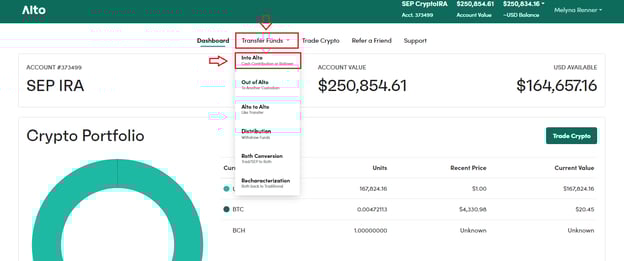
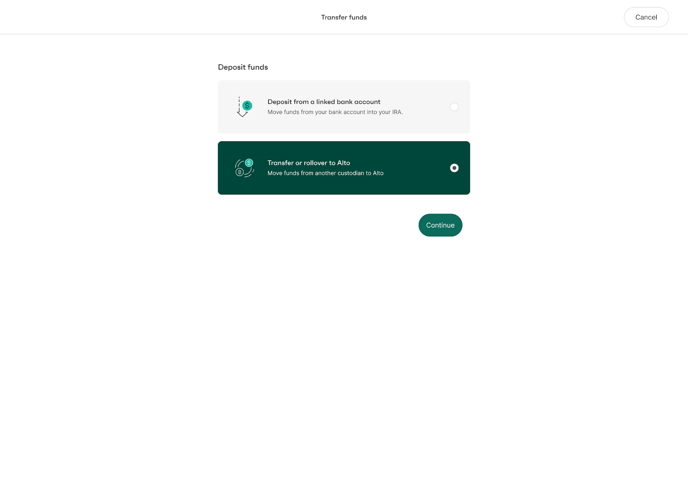
- Choose IRA Transfer
- Select IRA Transfer as your funding method
- Choose the type of funds you’re transferring (e.g., Traditional, Roth, SEP).
- This ensures your transfer aligns with the correct Alto IRA type.
- This ensures your transfer aligns with the correct Alto IRA type.
- Select your current custodian.
- Use the search bar or scroll through the list.
- You’ll see the top eight custodians displayed first, based on data from the last 24 months.
- If your custodian isn’t listed, select Other.
- Enter your account number.
- This helps Alto prepare the required Transfer of Assets (TOA) form for your custodian.
- Select your receiving Alto account.
- If you only have one qualifying account for the selected type, it will pre-fill automatically.
- If you only have one qualifying account for the selected type, it will pre-fill automatically.
- Choose your transfer method — typically wire or check.
- Wire transfers generally process faster.
- Wire transfers generally process faster.
- Review your details and click Continue.
- You’ll now be prompted to sign your Transfer of Assets (TOA) form electronically using HelloSign (or Dropbox Sign).
- Click Sign to open the signature form.
- Follow the on-screen steps to review, sign, and submit the form.
- You’ll see confirmation once the form has been successfully submitted.
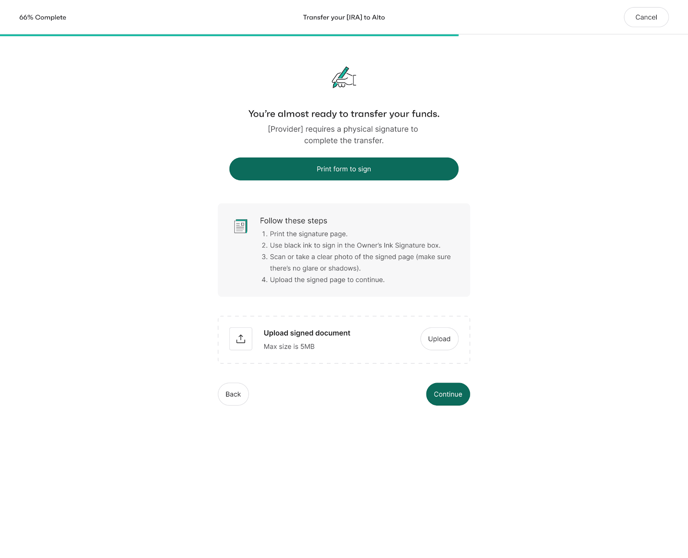
Note: A small number of custodians (fewer than 8%) require additional verification steps such as a wet signature or medallion signature guarantee. If required, instructions will appear on-screen after signing.
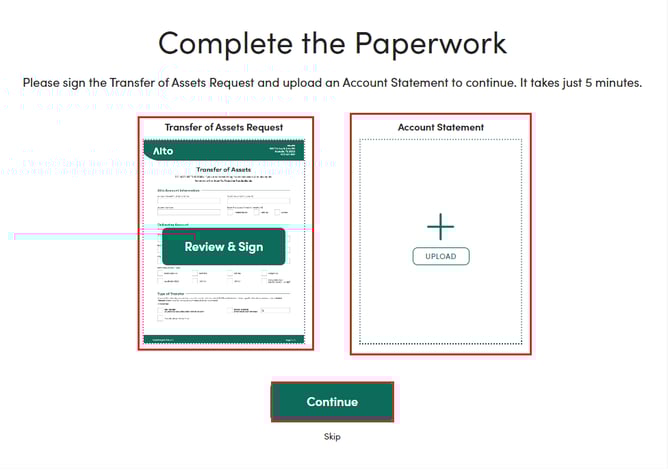
- Upload Your Statement (if prompted)
Some custodians may require a recent account statement for verification.If prompted:
- Click Upload under Statement Summary.
- Choose a PDF or clear screenshot of your statement.
Click Open, then Continue once both checkmarks appear.

- If a Wet Signature is Required
- Click Print to download your Transfer of Assets Request form
- Sign the form in black ink in the Wet Signature Required section
- Scan the signed form as a PDF
- Return to the Wet Signature Required step in your Alto dashboard
- Upload the scanned PDF and click Submit
Next Steps After Submitting Your IRA Transfer
Once you’ve completed the IRA Transfer process in your Alto dashboard, we’ll review your request and fax it to your transferring custodian.
- What to Do Next
- Follow up with your custodian 1–2 business days after initiation to confirm they received the request and have started processing.
- If your custodian has not received the request, contact us and we’ll resend it right away.
- Processing Times
- Wire Transfers
- Processing times vary by custodian. Some send wires quickly, while others may take several business days to review and release the funds.
- Once a wire is sent and received by Alto, we’ll allocate it to your account within 24 business hours.
- Check Transfers
- If your custodian sends the check by standard mail, it may take 7–15 business days to arrive. If overnighted, it usually arrives within 1 business day.
- All checks are held for 4 business days after receipt to help prevent chargebacks. Funds are allocated on the 4th business day.
- Wire Transfers
Once the funds are received and credited to your Alto account, you’ll receive an automated confirmation email with the details.
Tips for a Smooth Transfer
We recommend reaching out to your custodian after submitting your request to:
- Confirm they’ve received the transfer paperwork
- Ask when they expect to send the funds
- Request tracking details if the transfer will be sent by check
How to Cancel an IRA Transfer
- If you haven’t completed the transfer process in your Alto dashboard, please contact our Support team, and we can cancel it for you.
- If you’ve already received confirmation that the transfer request was sent to your custodian, you’ll need to:
- Contact your custodian to cancel the request on their end
- Once they confirm the cancellation, reach back out to us, and we’ll cancel the request in our system as well
Need Help?
If you have any questions, we’re happy to assist:
Looking for information on CryptoIRA? Visit https://public.com/invest/crypto-ira.