
Here’s how to transfer funds from your Alto account to another retirement account:
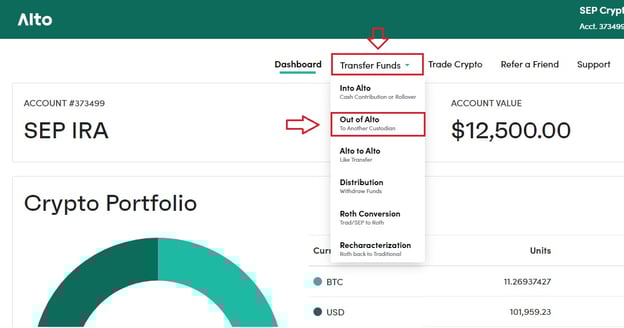
- Select Transfer Funds at the top of the page
- Select Out of Alto from the drop-down menu
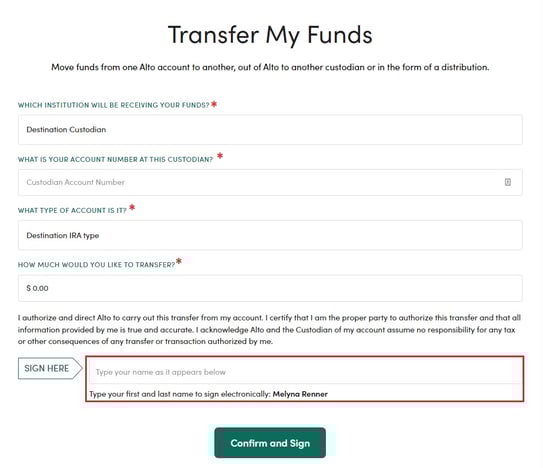
- Enter destination custodian name
- Enter destination custodian account number
- Select IRA type
- Select the amount you would like to transfer
- Enter your name to e-sign the request
Pro Tip: For your transfer request to be completed quickly, be sure to double-check that the information provided for the account you want to transfer to is completely accurate. Any incorrect information could delay the request.
Ask your custodian to send Alto a transfer request.
Reach out to the custodian you're transferring to and ask them to submit a transfer request to Alto. This step needs to be initiated by you, the account holder, and unfortunately we're unable to process your transfer until we receive that request from your new custodian.
Your custodian can send us a transfer request through any of these methods:
- Email - [email protected]
- Fax - 615.334.4771
- Mail - Alto Solutions, Inc. 500 11th Ave N Suite 790 Nashville, TN 37203
What happens once my transfer request has been completed and submitted to Alto?
Once we receive your outgoing transfer request, we can send a wire within 1-2 business days. If a check is requested instead, processing typically takes 10-12 business days for the check to be issued and received by your new custodian.
Note: depending on how your current custodian submits the transfer request, it can take 10+ business days from the time they send it to the time we actually receive it.
Looking for information on CryptoIRA? Visit https://public.com/invest/crypto-ira.